

One of the most frustrating things about Claude Code is the 5-hour-limit and Weekly-limit. These limits force unnatural barriers to a good workflow. It is truly horrific to be 95% done with a critical project, then hit the limit and be stopped right as you were working well. I truly understand that Anthropic wants to limit their bandwidth. But their choice of limits seems childish and annoying. I suspect that Anthropic internal staff have unlimited accounts, so in-house they have no idea how annoying these limits are.
Claude’s 5-hour-limit is a rolling window. The window starts with your first message of the day*. It then rolls over every five hours. Anthropic’s documentation on how usage limits work is clear about that trigger. Most people never think about when the window opens. They start work, hit the wall around lunchtime, get the refill and hit the wall at the end of the day. In this article, I want to share ideas to optimize your workflow and hack the limit so that you can work non-stop with Claude for 8, 10, and even 15-hour days.
* Does not have to be a message. I have found that opening Claude on my phone starts the session timer without typing anything at all.
Start by Understanding the 5-Hour Limit
The first key frame is to understand your enemy. It’s right there – the 5-hour limit. Think about that, and think about your day. Most people work a standard 9-hour workday – 4 hours, one-hour lunch, then 4 more hours. That splits pretty cleanly into two 5-hour sessions. And for the context of this article, let me cover some vocabulary:
Keywords in this article:
- Session – One work session in Claude
- Conversation – One thread in Claude Code
- Turn – One message sent with a reply from Claude
- Pile – The active context size that gets sent to Claude-Cloud from the conversation
- Token – AI Token – one word is about 1.4 tokens.
The number of tokens in a 5-hour session depends on your seat level
- Claude Pro is the baseline.
- Claude Max gives 5x or 20x more per session than Pro.
- Claud Team Standard seats give 1.25x Pro.
- Claude Team Premium seats give 6.25x Pro.
Through testing, I’ve found that my Claude Team Standard gives me 117M tokens, so Claude Pro should be about 93M tokens per 5-hour window. If you type /usage, you can see your active percent, and you’ll know the approximate total for that percent.
Your allowance is shared between Claude and Claude Code.
These are the facts. So let’s use them to plan an optimized day.
Plan Your Day Around the Window, Not the Other Way Around
Say you start work at 8:00. Window one runs to 1:00. Window two runs to 6:00. But you quit at 5:00. The last hour of window two dies unused.
Creative people break the limits. Consider how useful your day can be if you had a 2-hour session to start, then 5 hours (with lunch in the middle) and then 2 more hours. You can push hard in the key early session and late sessions – depending on whether you are a morning person or evening person. Three 5-hour sessions, instead of 2 sessions, 270M tokens instead of 180M tokens. That’s power.
And it is surprisingly easy.
Put Claude on your phone, and when you wake up in the morning, open it. That’s all. Some people report that you need to say Hi – so make a session using Claude Haiku (very lightweight) and tell Claude “hi” before you take your shower. By the time you get to work and sit down – your session is already 2-3 hours old. QED.
Some people report a technique to automate this, and there are a number of ways to do it in Claude, or using Windows Task Manager.
Spend Your Downtime on Purpose
Lunch is a free hour of window. So is a meeting. So is a commute. Never idle inside a fresh window. Idle inside a spent one.
Put your heavy agent work in the first hour after a rollover. Put email and meetings in the last hour before a wall. Breaks are not lost time. They are the cheapest scheduling tool you have.
Put a Usage Meter in Your Taskbar
There is such a thing as a usage meter for Windows Taskbar. The one I like is free and open source. It is CodeZeno’s Claude Code Usage Monitor. It sits in the Windows taskbar and shows two bars. One bar is your 5-hour-limit. The other is your weekly-limit. Each shows a percentage and a countdown.
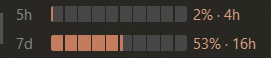
That is the whole point. It is passive. You see the wall coming while you work. A tray icon you have to click only answers when you remember to ask.
It also tracks Codex, Cursor, Antigravity and OpenCode.
Installing It
Open PowerShell and run:
winget install CodeZeno.ClaudeCodeUsageMonitorThere is no window. The app is silent by design. Look at your taskbar.
When the Bars Show an Exclamation Mark
The bars appear, but they show ! instead of numbers. It means the monitor cannot authenticate.
The cause is simple. The monitor reads a credentials file at .claude\.credentials.json in your home folder. The Claude desktop app never writes one. It keeps your token inside Electron safeStorage, which no other program can read.
The fix is to install the standalone CLI and log in once. That login writes the file.
winget install --id Anthropic.ClaudeCode -eRestart PowerShell. Then run:
claudeA browser opens. You approve the login. Confirm the file landed:
Get-ChildItem -Force "$env:USERPROFILE\.claude\.credentials.json"The monitor picks it up. The bars come alive.
Two Things to Watch
If typing claude does something strange, you have a name collision. Check it:
Get-Command claude -AllI had a claud.bat file in my path that caused an issue. I renamed the batch file. The real CLI took over. It forced an OAuth login, which took only a minute. And then my credentials are saved (in plain text on my disk – did you see that, Anthropic?)

The Hack: Ping Claude Before Your Workday
Here is the whole trick. Send one throwaway message before you start work.
Use Haiku. Ask Claude to reply with one word. The content does not matter. What matters is the timestamp.
That message opens your window. Everything after it rides on a clock you chose.
Set it for 6:00, and your first wall moves to 11:00. That lands on your coffee break, not your deadline. Your second window then covers the whole afternoon.
It Can Come From Your Phone
This is the part most people miss. Your allowance is shared. A message in the Claude app counts the same as a turn in Claude Code.
So you do not need to be at your desk. Open the app in bed. Send one line. Go back to sleep.
I tested this myself. My window opened at 2:15 in the morning, from my phone. My first Claude Code turn that day was at 5:40, and it was already inside an open window.
Automating It
You can also schedule it. Claude Code supports scheduled tasks that fire a prompt at a set time. Point it at a cheap model. Have it reply with one word.
Windows Task Scheduler works too. So does a phone alarm and ten seconds of typing.
The Reddit thread that popularized this is Pro tip: reset your usage limits on your schedule. XDA covered it as well.
The Emergency Button: /limit-reset
Anthropic does not document this command anywhere. It surfaced on Reddit in early September 2026, in this r/ClaudeAI post. Everything written since traces back to it.
/limit-resetIt clears your 5-hour-limit on the spot. No waiting. You keep working.
It answers like this:
Session limit reset - next reset available Sep 4 at 2 pm - your weekly limit still appliesRead that last clause twice. It is the catch.
What It Does Not Do
It does not give you free tokens. Everything you spend after the reset still counts toward your weekly-limit.
Eligibility is unpublished. Some accounts get refused with “A session-limit reset isn’t available right now.” My colleague swears this grabs from the next 5-hour chunk – which would be great if true.
When to Spend It
Save it. It is worth the most on the day you least expect.
Use it when you are near the end of real work, and the wall arrives early. Do not use it at 9:00 on a Monday. You will want it on Thursday afternoon.
Habits That Stretch both 5-hour-limit and weekly-limit
If you are like me, it is your own bad habits that cause you to hit the limit at all. Fix your habits, and you will never hit a limit again.
The key thing is misreading the context usage circle at the bottom right of the Claude Screen. Seeing this circle halfway – does not mean you are halfway done. It means that you are already sending way too much data with every turn.
Change your habit to never fill the circle more than ¼ – – use /compact a lot. Keep your conversations tight. This means your per-turn token use is significantly lower. This one change can reduce your hourly usage by 90%
What Pile Size means for Token Use
The pile is the reason people run out fast. Your whole conversation gets re-sent on every turn. A bloated conversation charges you full price for work that has not changed.
Four habits do most of the work.
Compact early. Do not wait for the automatic pass. Move the trigger yourself:
/autocompact 200kForce short replies. Put a rule in your CLAUDE.md file. Every extra word rides along on every later turn.
Never let Claude sweep local data drive. Name the directory. Ask for a narrow pattern. A recursive search can cost 200,000 tokens across a session.
Retire old conversations. Resuming a three-week-old thread feels efficient. It is the opposite.
Why This Matters So Much
I measured a conversation of my own. It had run since August. Each turn cost about 500k tokens. A healthy conversation runs 80k.
Forty-two turns in that one conversation ate 21M tokens. That was 89% of my day.
One of those turns produced a 69-token reply. It cost 485k tokens.
At 117 million tokens per window, that single conversation was burning a fifth of my allowance in under an hour.
I wrote these up in full, with the measurement scripts, in How to Stop Hitting Your Claude Code Usage Limit.
What Happens When You Hit the Limit
Nothing breaks. Claude stops and tells you when the window reopens. Your conversation waits for you.
Can You Get Unlimited Usage?
No. No plan is unlimited. Max 20x is the largest, and it still has both limits.
The only real way to raise your ceiling is to change plans or seats. No add-on buys a bigger 5-hour window.
Can You Get Extra Usage Free?
There are two narrow paths. Both are real. Neither is easy.
The first is /limit-reset, covered above. One per week, and it does not touch your weekly-limit.
The second is Claude for Open Source. Anthropic gives six months of Max 20x to 10,000 open source maintainers. That is $1,200 of value.
The bar is high. You need 5,000 GitHub stars, or a million npm downloads a month. You also need recent commits. A new repository will not qualify.
Are There Peak-Hour Limits?
No. Anthropic does not vary your allowance by time of day. The variable is you. Your window starts when you start. That is why two people on the same plan hit the wall at different hours.
Working Smarter to Hack 5-hour-limit
You cannot buy a bigger 5-hour window. You can decide when it opens. That is the whole shift. Most people treat the limit as a budget. It is closer to a schedule.
Most of us never think about how much the limit controls our workday. But thinking and planning means an optimized workflow. Understanding the pile and token use fixes the other usage problems. Adding a tracker means you can see what is going on all day.
Ping Claude before work. Put the meter in your taskbar. Compact at 200k. Hold /limit-reset for the day that actually needs it.
These things will allow you to use Claude continuously while never hitting your limit again. Same Plan. Same Price. The limit never moved. Your day did.