

 Tweet
Tweet
I was going to express my great satisfaction with build 589, until I opened my calendar to find everything missing. It was there last night. This morning it is gone.
-
-
Issues with 589
I don't know if the new build had anything to do with the loss of calendar data. Actually I have it until 04/24/2014 which is about the date I started playing with Pimlicol - a similar app. Even the never ending recurring items stopped that date. The loss occurred after I removed Pimlicol. Anyway, I in adding these back, I noticed the following.- After a calendar event has been entered using a template, the next use of any user defined template defaults to the date and time of the original.
- In contacts, changing categories quickly to assure I have lost nothing there results in the inability to refresh on a new category.
Having said all that, let me continue what I started to say in my first post in this thread. Love the new capabilities. I stopped using Pocket Informant for Deja but started investigating Pimlicol for a couple of things I liked about it, primarily the use of category colors for the whole event bar. After the last two builds, I'm sticking with Deja. 589 rocks. It has almost everything I could want. Very close to what was available on my Palm.Last edited by shdytxmn; 05-08-2014, 06:23 AM. -
Oh! Glad it came back. I saw your note (new posts get forwarded to me) and was going to reach out right away.
As far as I know, you are the first person to try the templates. Here's the classroom on them:
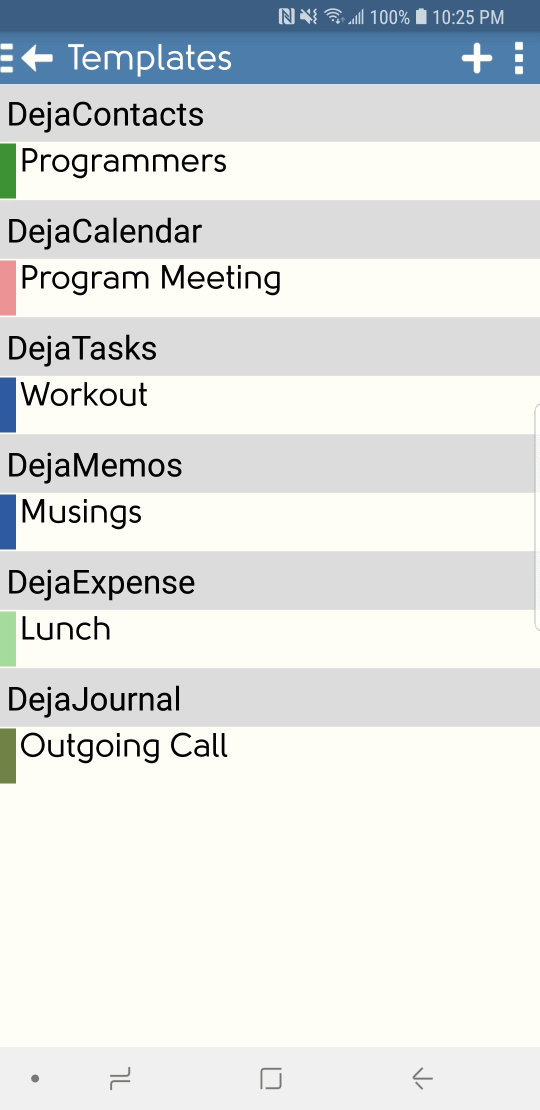
For #2, can you give further details. Are you using the list header to change categories, or the context menu?
Might it be that if you select a category, and before it fully draws, select another category? Is this the case we should test?Comment
-
Didn't find the classroom (seldom use helps) but that is the way I did it.
I find the date and time set on the originally used user created template carries to all the other user defined templates but not the "No Template" template. BTW, I love the templates. Get the date and time issue fixed and this is a great time saver. Still saves time, even with the date/time issue.
For # 2, I use the list header (assuming that is what you call the list selected from the 3 vertical dots on the header). It may well be that I was changing before it was fully drawn though I'm not that fast and the screens were fully drawn. In any event, I can't duplicate it.Comment
-
Just saw this post. Downloaded the new version and it seems to work great. Having a template for some of my calendar entries is a big time saver. You've done it again, DJO!!Mobile Device and OS: Samsung GALAXY S9+ SM-G965U for Verizon [03/18/16] Android version 9 (Pie)
CompanionLink for Outlook 8 (build 8042) downloaded & installed 8/15/19 on WINDOWS 10 Pro
Data Manager App Outlook (Office 365)
Sync Method with CompanionLink: ADB Mode
DejaOffice Sync Settings for Contacts and Calendar. - Contact account: "Phone" Calendar account: rlevine.droid@gmailComment
-
Wait until you see the location finder...Comment


Comment